How people opt in to Up4It texts
Up4It sends one kind of text message: a one-time verification code that confirms a person owns the phone number they entered. Nobody receives a text unless they request it themselves in the app.
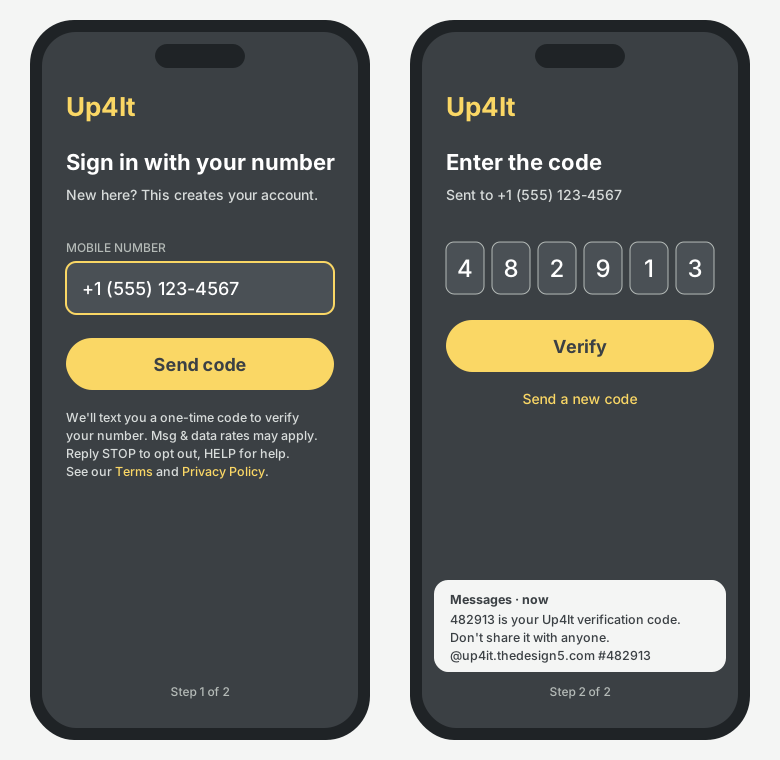
Opt-in workflow
- The person installs Up4It and opens it. The phone number is how people sign in, like WhatsApp; there is no separate username or password.
- On the Sign in with your number screen, they type their own mobile number.
- Directly below the Send code button, the screen shows:
We'll text you a one-time code to verify your number. Msg & data rates may apply. Reply STOP to opt out, HELP for help. See our Terms and Privacy Policy.
- They tap Send code. This tap is their consent; we send one text containing the code.
- They enter the code on the Enter the code screen. They are signed in, and no further texts are sent unless they sign in on another phone.
Message details
- Sample: "482913 is your Up4It verification code. Don't share it with anyone. @up4it.thedesign5.com #482913"
- Frequency: one message per request; at most 5 per day per account, and at most one every 30 seconds.
- Content: verification codes only. No marketing, promotional or third-party messages.
- Who receives one: only the number typed on the sign-in screen, at most 5 times a day, with further limits per device. Signed-in sessions last up to 90 days, so a person normally gets a code only when setting up a new phone.
- Opt out: reply STOP at any time. Reply HELP or email admin@thedesign5.com for help.
Phone numbers are used only for verification and are never shared or sold. See the Privacy Policy and Terms of Service.